Showing posts with label Web Development. Show all posts

Sunday, 4 January 2015

Disable caching in Chrome

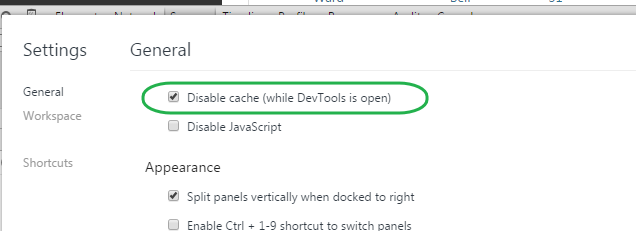
So, you're working on a web app and you can't figure out why the CSS/JS the browser is pulling back is stale. 15 minutes later you realise that it's the pesky browser caching the data - again!

...Here's a nice little settings tweak for Chrome. Disable Cache invalidates the disk cache, which is great for developing but only works if devtools is open.

Tuesday, 21 January 2014

Should I be supporting those pesky users without JavaScript enabled?

In the past, I've personally been an strong believer that progressively enhancing your web site was the best approach for handling users with JavaScript (JS) disabled. This way, users without the luxury of JS (for whatever reason) get the basic functionality; whilst the other ~99% have their JS enabled browsers 'enhancing' their experience.

Recently however, I've been wrestling as to whether this is the correct approach, it isn't easy and can be costly in development time and effort. Am I just being old fashioned by sticking with the progressive enhancement approach? Possibly.

What should you be considering when deciding whether to support users without JS? I think there's two important questions/areas to cover...
  • What's the volume of users hitting your site and what are the percentage of your users that don't have a JS enabled browser?
    • If you don't have this data, it's simple to get by placing images loaded in different ways on your most popular page and reviewing your web server logs (using something like log parser) to compare: 
      • An image (a blank gif) loaded using a standard img tag in the body of the HTML page
      • An image loaded using JS
    • Think about it, 1% is a big number if you've got 1 million users hitting your site every month!
  • Should your site need JS to function properly? 
    • Don't complicate your web apps unnecessarily by throwing JS in as a requirement. Progressive enhancement works great in a lot of scenarios!
    • Does your ecommerce web app, really need JS enabled before someone can give you their money? Probably Not. Does your interactive messaging web app really need JS enabled to work properly? If you want to give your users a rich and interactive experience, yes.
You can always serve two different versions of your applications, this is what GMail does:


So I suppose I'm giving you the consultants answer of "It depends!". But it really does, it's not just black and white.

One more thing. If you do decide not to 'properly' support users without JS, you should let them know, rather than them just leaving them with a bad taste in their mouth over your "broken" web site.

Useful Links


Monday, 28 October 2013

Html Encoding in ASP.Net MVC (and avoiding XSS)

Stop using <%= %> syntax in your ASP.Net sites...

Cross-site script injection (XSS) attacks are the most common security issues associated with web applications. Guarding against cross-site scripting attacks is relatively easy; just make sure that rendered output is HTML encoded within a page. This helps ensures that any content that might have been input/modified by an end-user cannot be output back onto a page containing <script> elements.


Ways of encoding with ASP.Net

ASP.Net applications (especially those using ASP.Net MVC) often rely on using <%= %> code-nugget expressions to render output. You can use the Server.HtmlEncode() or HttpUtility.Encode() helper methods within these expressions to HTML encode the output before it is rendered; this however can be verbose and easily forgotten!
A more convenient way was introduced in ASP.Net 4 (MVC 2), and that's the <%: %> syntax, this takes care of the encoding for you. If you're using the Razor engine introduced in ASP.Net MVC 3 then this also takes care of the encoding for you.
<div id="old">
<%= HtmlUtility.Encode(Model.Message) %>
</div>

<div id="new">
<%: Model.Message %>
</div>

<div id="newRazor">
<%: Model.Message %>
</div>

Avoiding double encoding

While HTML encoding content is often a good best practice, there are times when the content you are outputting is meant to be HTML or is already encoded – in which case you don’t want to HTML encode it again. The smart guys on the ASP.Net team decided to introduce a new IHtmlString interface (along with a concrete implementation: HtmlString) that you can implement on types to indicate that its value is already properly encoded (or otherwise examined) for displaying as HTML, and that therefore the value should not be HTML-encoded again. The <%: %> and Razor syntax checks for the presence of the IHtmlString interface and will not HTML encode the output of the code expression if its value implements this interface. 

For example, with ASP.Net MVC 2: the Html.TextBox() helper method returns markup like <input type="text" />. With ASP.Net MVC 2 these helper methods now by default return HtmlString types – which indicates that the returned string content is safe for rendering and should not be encoded by <%: %> syntax. This allows you to use these methods within both <%= %> syntax blocks, within <%: %> syntax blocks and within Razor engine syntax blocks. In both cases above the HTML content returned from the helper method will be rendered to the client as HTML – the <%: %> and Razor engine syntax will avoid double-encoding it.

Always use the <%: %&gt or Razor engine syntax to encode your HTML output; there's no reason to use the <%= %> syntax anymore!

Sunday, 13 January 2013

PaaS offerings and AppHarbor

This may sound a little obvious, but writing the code for web apps is often the easy part for developers - because that's what developers are good at. I believe developers should be free to focus on writing the code and adding business value. In reality, the developers often get involved with the headaches that come from deploying, load balancing, scaling and monitoring the apps. But with more and more Platform as a Service (PaaS) offerings popping up, it seems like our lives as developers are beginning to get a little easier.

Our technical director at work (Adam Bird) made me aware of AppHarbor.com around 12 months ago. Adam likes Ruby and had been using Heroku, which was a big hit with Ruby developers because it was an easy-to-use PaaS offering. AppHarbor has been called the 'Heroku for .Net'. It runs on Amazon's AWS infrastructure and is designed to take the pain out of quickly and safely deploying, scaling and managing any .NET web application. Appharbour also offers an impressive add-on feature catalog, allowing developers to easily integrate and configure a wide array of database, queuing, monitoring, indexing and email services with their applications.

Integration with AppHarbor can be achieved using various repository hosting services (e.g. BitBucket, GitHub and Codeplex). Developers can use Git, Mercurial or TFS when deploying code to AppHarbor; integrating deployment in the developer's workflow by letting developers use the tools they love.

My experiences

I've been really impressed with what AppHarbor are offering and was surprised at how easy (and low cost) it was to get an application I had running on an virtual machine elsewhere ported over. One of the biggest selling points for me is integration with GitHub and BitBucket. If you are migrating apps over you need to bear in mind certain limitations too (see below). AppHarbor offer a free tier for you to play around with, and a lot of the add-ons do too. I'd strongly recommend you give it a try.

I've listed what I liked most below, followed by some potential issues/warnings I came across.

Likes...

  • Low start-up costs
  • Your first deploy can take just a manner of minutes
  • Automatically deploy code from GitHub (or any of the other supported repository hosting services)
  • Support for compiling and running project tests; if the tests fail the app isn't deployed
  • Reverting to a previous app version is easily achieved through the control panel
  • Ability to integrate popular application monitoring add-ons (like New Relic) very easily

Potential issues/warnings...

  • If you are sharing forms auth cookies across apps hosted elsewhere you'll need to implement your own version of form auth and not rely on the .Net libraries (see AppHarbor blog)
  • File system access should be avoided due to the way Appharbor scales your app - put files in a shared data store
  • AppHarbor building and running tests is not going to work for larger projects with complicated tests
  • During my time playing around I've had a handful of intermittent yellow screens of death appear whilst using their control panel (not my own app) - which has made me question their stability

Monday, 17 September 2012

Questions to ask when reviewing a design

Found a post over on the 37signals site where Jason F. lists 'Quesions I ask when reviewing a design'. Might come in handy for some upcoming UI work we've got planned :)

Monday, 23 July 2012

Continuous Integration and Jenkins

I found this old draft post hanging around on blogger and it reminded me to a time long ago before CI servers were a part of my dev life, so I decided to post it...


Jenkins (formerly Hudson) is an open source continuous integration server and assists the development team by allowing us to easily integrate changes into our software projects from our source control with confidence. Jenkins can be automated to build, test and deploy any type of software automagically. Jenkins doesn't require bucket loads of learning before you start using it and it's very easy to set up. It's also super extensible and caters for a wide variety of programming languages/testing frameworks etc and there are a lot of plugins available - and I mean a lot.


Feedback is key. If Jenkins has any problems building, testing or deploying any projects it can alert the development team in a number of ways (e.g. through a GUI, email, twitter and many more). So as soon as the build or any tests fail we get alerted and the team react to fix those changes - it's never broken for long.


As you can imagine, once we made the effort to set up our software projects in Jenkins, it has improved our 'quality of dev life' dramatically. Automating the building, unit testing, integration testing and deployment straight to our staging environment for every check-in means we are more confident, less stressed and a lot more productive. Once happy with our staging environment we can one click an application release to live. So our application users are getting newer features faster than ever. Ignoring IDEs and source control, I'd argue a CI server is probably the next most fundamental tool in a developers tool belt.


Jenkins! How did we ever live without you?!


Monday, 10 January 2011

Firefox is King!

Internet Explorer loses its place as Europe's number one browser for the first time

...perhaps this will give Microsoft a kick up the arse!? Perhaps not.

IE's market share dropped to around 37.52 percent in December 2010 while Firefox's market share remained fairly consistent at 38.11 percent :)

Tuesday, 7 December 2010

Padding Oracle Crypto Attack (Update Released)

In case you missed it, you should by now all have updated your servers with the windows update to fix the Padding Oracle Crypto Attack:

Points worth noting:

  • You'll need to apply th fix to all your servers in the web farm as the encryption/decryption mechanism has changed.
  • Your users will have to log in again - forms auth tickets issued by your app prior to the update will no longer be valid.

Friday, 18 June 2010

Mock ControllerContexts in ASP.Net MVC

After performing an upgrade to MVC 2 for a web application last week, I had a number of tests failing. This gave me an opportunity to refactor some controller tests and create a base class for my controller test classes. This new base class is straight forward and allows me to mock HttpRequestBase and HttpSessionStateBase easily on the mock ControllerContext - it also has an overload for mocking AJAX requests too. I expect this class to grow in time but it serves my needs for now:

public class TestController
{
 public static ControllerContext GetMockControllerContext()
 {
  return GetMockControllerContext("GET", false, null, null);
 }

 public static ControllerContext GetMockControllerContext(string httpMethod, bool isAjaxRequest)
 {
  return GetMockControllerContext(httpMethod, isAjaxRequest, null, null);
 }

 public static ControllerContext GetMockControllerContext(Mock httpRequestBase, Mock httpSessionStateBase)
 {
  return GetMockControllerContext("GET", false, httpRequestBase, httpSessionStateBase);
 }

 public static ControllerContext GetMockControllerContext(string httpMethod, bool isAjaxRequest, Mock httpRequestBase, Mock httpSessionStateBase)
 {
  var headerCollection = new NameValueCollection();

  // Add header value for ajax requests
  if (isAjaxRequest) headerCollection.Add("X-Requested-With", "XMLHttpRequest");

  if (httpRequestBase == null)
  {
   httpRequestBase = new Mock();
   httpRequestBase.Setup(r => r.HttpMethod).Returns(httpMethod);
   httpRequestBase.Setup(r => r.Headers).Returns(headerCollection);
   httpRequestBase.Setup(r => r.Form).Returns(new NameValueCollection());
   httpRequestBase.Setup(r => r.QueryString).Returns(new NameValueCollection());
  }

  if (httpSessionStateBase == null)
  {
   httpSessionStateBase = new Mock();
  }

  var mockHttpContext = new Mock();
  mockHttpContext.Setup(c => c.Request).Returns(httpRequestBase.Object);
  mockHttpContext.SetupGet(c => c.Session).Returns(httpSessionStateBase.Object);

  return new ControllerContext(mockHttpContext.Object, new RouteData(), new Mock().Object);
 }
}

Friday, 11 June 2010

Time to Upgrade to ASP.Net MVC Web Apps to MVC 2?

Wondering if you should be upgrading to ASP.Net MVC 2? It is worth some serious thought as there's some powerful new features, the upgrade process is nice and simple, plus there aren't many breaking code changes. Why not take a peek at what's new in ASP.Net MVC 2 and I bet you'll see at least a handful of features that'll get you itching to upgrade ;)

If you decide to upgrade your web application then review the MVC 2 upgrade notes. They include instructions for upgrading manually or you can choose to use the upgrade tool. I've used the upgrade tool and it seems to work great for most people - but not me, I had two problems :( After the conversion completed I compiled my project and got an error:

It is an error to use a section registered as allowDefinition='MachineToApplication' ...

...I managed to fix this without pulling my hair out though. The only other issue I had was around 10% of my project tests suddenly started failing; a result of some change to the controller context processing (this resulted in me improving my controller tests by creating a base TestController). Again this was a nuisance rather than a show stopper - the upgrade was worth the effort :)

Thursday, 10 June 2010

IIS 6 Application Pools for Beginners

Application pools allow you to configure one or more web applications to a worker process. An application pool is separated from other application pools by worker process boundaries. So what does this mean? ...An application in one application pool is not affected by problems caused by applications in other application pools. This along with sensible recycling of your application pools, results in your web server being more efficient and reliable.

By default IIS 6 dumps everything into one application pool. So as you add new web applications to your server you should consider logically grouping them into pools. Due to there being an overhead for each application pool it makes more sense to group the web applications into related pools rather than just create a pool for each web application.

Recycling Your Application Pools

To keep your sites working efficiently your should configure IIS to periodically recycle your application pools and recycle them when they become unstable (using too much memory/cpu etc). Recycling cleans up memory fragmentation, memory leaks, abandoned threads and other bits of unwanted clutter. Note that when an application pool recycles, ASP.Net session state information stored in-process is lost for that pool, however other pools are not affected. If this is a problem then you'll need to use another session state mechanism for your ASP.Net web applications.

Application Pool Recycling Events

It's important that you review why your application pools are being recycling. For example, if you have a pool recycling every 30 mins due to excessive memory use then you have an issue with that applcation's code and it needs looking at. Event logs for application pools are off by default, to enable them see this Microsoft KB article.

Security

When you configuring your application pools you can configure the identity of each worker process to run as a different user and should consider how to configure application pools for application security. For example, you might need to create separate application pools for applications that require a high level of security, while allowing applications that require a lower level of security to share the same application pool.

Convinced?

Hopefully with this post you can see the benefits of spending some time in setting up your application pools in IIS and you've made a step in the right direction for improving your web server's reliablility and efficiency :)

Wednesday, 9 June 2010

ASP.Net allowDefinition='MachineToApplication' Error

I've come across this problem a number of times now and it was beginning to annoy me. A few times when building projects on continuous integration servers and today when upgrading my MVC web app to MVC 2 I hit the following error:

It is an error to use a section registered as allowDefinition='MachineToApplication' beyond application level This error can be caused by a virtual directory not being configured as an application in IIS.

Everytime I failed to figure out what the problem was and instead I had to admit defeat and use a work-around :(

Well the error message is quite helpful for some people getting this error at runtime and tells them how to fix the problem - configure the web apps virtual directory to be an application. However, I'd been stumbling upon this delightful error when compiling projects - not at runtime!

Luckily I had a light bulb moment... the compiler was not referring to my main web.config for the application, but instead was moaning about a web.config within a sub directory of my application (a backup of the project). Deleting the backup sub directory solved my problems!

I got 99 problems but my web.config ain't one!

Tuesday, 8 June 2010

Handling Unexpected Exceptions in ASP.Net MVC

There are way too many yellow screens of death out there on the net for my liking. But rather than trying to bullet proof your MVC web apps by putting try catch blocks in all your MVC actions to handle unexpected exceptions, there is a far easier way to do it and it keeps your code nice and DRY - see my code snippet below:

public class BaseController : Controller
{
 
 protected override void OnException(ExceptionContext filterContext)
 {
  // Record the error
  Log.Error("Unexpected error in controller", filterContext.Exception);

  // Uses customErrors element from web.config
  if (filterContext.HttpContext.IsCustomErrorEnabled)
  {
   // Set exception as handled and status code 500
   filterContext.ExceptionHandled = true;
   filterContext.HttpContext.Response.StatusCode = (int)HttpStatusCode.InternalServerError;

   this.View("Error").ExecuteResult(this.ControllerContext);
  }
 }

}

I override the OnException method within a base controller for my other controllers to inherit from. Any unhandled exceptions in my action methods will hit this and I can gracefully log the exceptions and send the user to a helpful error view (as long as customErrors for the app are set to true) - it's worth noting I also set an appropriate HTTP status code :)

Wednesday, 21 April 2010

Compile Your ASP.Net MVC Views

A big problem with ASP.Net MVC views is the amount of inline code you put in your views that could potentially result in errors that aren't apparent until runtime. Microsoft did spot this as a problem and kindly introduced a way of checking your views for compilation errors when you compile your source, here's how to enable the feature:

Open up your project file for editing either in Visual Studio by right clicking the project file and choosing 'Edit Project File' or just use your favourite text editor. At the top of the project file you'll see a PropertyGroup XML element with a child element of MvcBuildViews, change the value of this to true...


 true

This results in a build event at the bottom of your project file getting called...


That's it! You now are that little bit more confident in your deploys :)

Further Points

Increase in Build Time and How to Avoid

This will add an overhead to your builds, so depending on the size of your MVC project this could extend your build time substantially. However, thanks to a discussion with some other team members at Esendex (Alex and Jon) there is a way of avoiding the overhead the majority of the time. Create a new project configuration in Visual Studio, called something like Debug with Views Compilation. This will add a new PropertyGroup section in your project file for this configuration. Set the MvcBuildViews element to true in this new section. Remember to ensure the default section value for MvcBuildViews is false but set the release section value to true.


   false


   true


   true

Quite useful if you are working within your MVC app and not changing the views at all.

Problems with Non-Standard Project Builds

If you are building a standard MVC project on a developer machine then everything should work fine. If your MVC project isn't standard you may find you have to play with the PhysicalPath part of the AspNetCompiler. To get our CI build machine building this project I had to change the PhysicalPath value to $(WebProjectOutputDir), this value is passed in as a parameter when calling the build on your project.


MSBuild.exe myproject.web.csproj /target:Rebuild,ResolveReferences,_CopyWebApplication /p:Configuration=Release;
Architecture=x86;WebProjectOutputDir=build\release\web\;OutDir=build\release\web\bin\ 

Hope this info is useful to someone out there!
Wednesday, 14 April 2010

My Top 5 Firefox Plugins for Web Developers

Here are my favourite plugins for mine and every other decent web developers' favourite browser - Firefox :) All are essential in my day to day web development and I'd cry if you took them away...

Firebug

The web development tool I use most. It keeps me sane when debugging strange web site behavior. Use it for inspecting markup for elements, css, modifying it in real-time, debugging javascript, analysing network usage and a whole lot more.

YSlow

A Firefox addon that integrates with firebug (so you'll need to install that first). Great for analysing web site performance and suggesting performance improvements.

Web Developer

Adds a menu and toolbar to Firefox with lots of handy web developer tools, e.g. a link validator, a html validator, a 'small screen rendering' option for simulating mobile browsing and a bunch of other things too.

SenSEO

A web page analyser for reviewing your search engine optimisation criteria. Handy in its own right but very useful to the non SEO educated web developers out there.

IE Tab

A useful tool for easily and quickly viewing pages rendered as IE would. unfortunately this won't work for the very latest firefox release but hopefully they'll update the extension soon.