Sunday, 4 January 2015

Disable caching in Chrome

So, you're working on a web app and you can't figure out why the CSS/JS the browser is pulling back is stale. 15 minutes later you realise that it's the pesky browser caching the data - again!

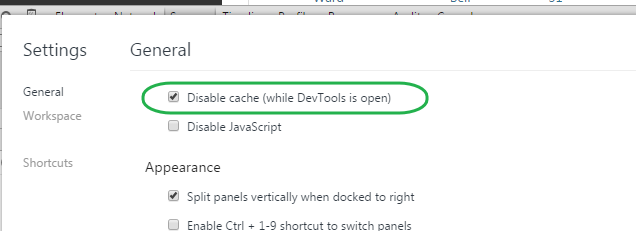
...Here's a nice little settings tweak for Chrome. Disable Cache invalidates the disk cache, which is great for developing but only works if devtools is open.

Tuesday, 21 January 2014

Should I be supporting those pesky users without JavaScript enabled?

In the past, I've personally been an strong believer that progressively enhancing your web site was the best approach for handling users with JavaScript (JS) disabled. This way, users without the luxury of JS (for whatever reason) get the basic functionality; whilst the other ~99% have their JS enabled browsers 'enhancing' their experience.

Recently however, I've been wrestling as to whether this is the correct approach, it isn't easy and can be costly in development time and effort. Am I just being old fashioned by sticking with the progressive enhancement approach? Possibly.

What should you be considering when deciding whether to support users without JS? I think there's two important questions/areas to cover...
  • What's the volume of users hitting your site and what are the percentage of your users that don't have a JS enabled browser?
    • If you don't have this data, it's simple to get by placing images loaded in different ways on your most popular page and reviewing your web server logs (using something like log parser) to compare: 
      • An image (a blank gif) loaded using a standard img tag in the body of the HTML page
      • An image loaded using JS
    • Think about it, 1% is a big number if you've got 1 million users hitting your site every month!
  • Should your site need JS to function properly? 
    • Don't complicate your web apps unnecessarily by throwing JS in as a requirement. Progressive enhancement works great in a lot of scenarios!
    • Does your ecommerce web app, really need JS enabled before someone can give you their money? Probably Not. Does your interactive messaging web app really need JS enabled to work properly? If you want to give your users a rich and interactive experience, yes.
You can always serve two different versions of your applications, this is what GMail does:


So I suppose I'm giving you the consultants answer of "It depends!". But it really does, it's not just black and white.

One more thing. If you do decide not to 'properly' support users without JS, you should let them know, rather than them just leaving them with a bad taste in their mouth over your "broken" web site.

Useful Links


Monday, 28 October 2013

Html Encoding in ASP.Net MVC (and avoiding XSS)

Stop using <%= %> syntax in your ASP.Net sites...

Cross-site script injection (XSS) attacks are the most common security issues associated with web applications. Guarding against cross-site scripting attacks is relatively easy; just make sure that rendered output is HTML encoded within a page. This helps ensures that any content that might have been input/modified by an end-user cannot be output back onto a page containing <script> elements.


Ways of encoding with ASP.Net

ASP.Net applications (especially those using ASP.Net MVC) often rely on using <%= %> code-nugget expressions to render output. You can use the Server.HtmlEncode() or HttpUtility.Encode() helper methods within these expressions to HTML encode the output before it is rendered; this however can be verbose and easily forgotten!
A more convenient way was introduced in ASP.Net 4 (MVC 2), and that's the <%: %> syntax, this takes care of the encoding for you. If you're using the Razor engine introduced in ASP.Net MVC 3 then this also takes care of the encoding for you.
<div id="old">
<%= HtmlUtility.Encode(Model.Message) %>
</div>

<div id="new">
<%: Model.Message %>
</div>

<div id="newRazor">
<%: Model.Message %>
</div>

Avoiding double encoding

While HTML encoding content is often a good best practice, there are times when the content you are outputting is meant to be HTML or is already encoded – in which case you don’t want to HTML encode it again. The smart guys on the ASP.Net team decided to introduce a new IHtmlString interface (along with a concrete implementation: HtmlString) that you can implement on types to indicate that its value is already properly encoded (or otherwise examined) for displaying as HTML, and that therefore the value should not be HTML-encoded again. The <%: %> and Razor syntax checks for the presence of the IHtmlString interface and will not HTML encode the output of the code expression if its value implements this interface. 

For example, with ASP.Net MVC 2: the Html.TextBox() helper method returns markup like <input type="text" />. With ASP.Net MVC 2 these helper methods now by default return HtmlString types – which indicates that the returned string content is safe for rendering and should not be encoded by <%: %> syntax. This allows you to use these methods within both <%= %> syntax blocks, within <%: %> syntax blocks and within Razor engine syntax blocks. In both cases above the HTML content returned from the helper method will be rendered to the client as HTML – the <%: %> and Razor engine syntax will avoid double-encoding it.

Always use the <%: %&gt or Razor engine syntax to encode your HTML output; there's no reason to use the <%= %> syntax anymore!

Monday, 16 September 2013

What browsers does your app support?

To focus on supporting modern browsers, we are deprecating official compatibility of Google Analytics with Microsoft Internet Explorer 8 (IE8) at the end of 2013.

Above is a snippet from the latest blog post on the Google Analytics blog. The Analytics team have made the bold(ish) step of announcing the end of the line for IE 8 support in the next 3 months. It doesn't seem all that long ago when they announced they were dropping support IE 7 (and Firefox 3.5/Safari 3); but that was back in June 2011! Don't forget that they dropped proper support for IE 8 in a range of Google Apps like Gmail and Calendar last year, those users get basic HTML offerings with many features removed or read-only type views of the apps.

I'd love to see the analytics browser usage data for Google Analytics to see how many of their customer's are going to be affected!

I'm going to use this news as motivation to drop our legacy IE support (we still support even older browsers than IE 8 :/) - I'll let you know how it goes.

Tuesday, 21 May 2013

Git branching tutorial

Working with branches in git is easy. That's not saying there's some powerful, more advanced commands for complicated branching scenarios. This git branching tutorial demonstrates the basics and those advanced commands you may not even be aware of - worth a play if you've got 30 mins spare.

Monday, 20 May 2013

OWASP web application security cheat sheets

The OWASP Cheat Sheet Series was created to provide a concise collection of high value information on specific web application security topics. These cheat sheets were created by multiple application security experts and provide excellent security guidance in an easy to read format.

https://www.owasp.org/index.php/Cheat_Sheets

Nice CSS layouts tutorial...

Tutorial that demonstrates CSS fundamentals to novices well (also useful for veterans looking for a friendly refresher).


http://learnlayout.com/

Monday, 11 February 2013

Disable or hide UI components?


When rendering the UI for a user, if a user doesn't have access to certain options, should the UI components be disabled or hidden?

I've been pondering this question all day and my particular use-case relates to navigation in an app. After lots of thinking, some discussions and some googling for UI wisdom, I've come to a fairly definitive conclusion. Users should have visibility on all components/options as long as the user can potentially use them. What I mean here, is that if the components require certain conditions to be met before the user can use them then they should still be present. If for the current user the components can never be used - they should be hidden. An inconsistent UI should be avoided and an inconsistent UI where components come and go will only confuse users more. A good analogy suggested by someone on a similar topic:


When the light bulb burns out, the light switch is still there. In the physical world, things don't disappear in thin air when they switch to a unusable condition.

Obviously there's probably exceptions to this rule, but I imagine this will hold true for most use-cases of this nature.

Wednesday, 30 January 2013

Don't assume anything about the lifetime of ActionFilters in MVC3

In previous versions of ASP.NET MVC, action filters were created per request except in a few cases. This behavior was never a guaranteed behavior but merely an implementation detail and the contract for filters was to consider them stateless. In ASP.NET MVC 3, filters are cached more aggressively. Therefore, any custom action filters which improperly store instance state might be broken.

Taken from the 'breaking changes' section of the release notes for MVC3.

The statement is clear enough to someone feeling the sting still from a recent live issue, but I've outlined a bad and good example of custom action filters below. Basically, if you find yourself needing to store state for the lifetime of a request, use the filterContext.HttpContext.Items collection.


Bad custom action filter

public class BadActionFilter : ActionFilterAttribute
{
    private string _userState;

    public override void OnActionExecuting(ActionExecutingContext filterContext)
    {
        _userState = someSortOfDataUniqueToUser();
    }

    public override void OnActionExecuted(ActionExecutedContext filterContext)
    {
        // using _userState here is a bad idea!
    }
}

Good custom action filter

public class GoodActionFilter : ActionFilterAttribute
{
    public override void OnActionExecuting(ActionExecutingContext filterContext)
    {
        var userState = someSortOfDataUniqueToUser();
        filterContext.HttpContext.Items["userState"] = userState;
    }

    public override void OnActionExecuted(ActionExecutedContext filterContext)
    {
        var userState = filterContext.HttpContext.Items["userState"];
        // using userState here is perfectly fine!
    }
}

Monday, 28 January 2013

Kanban Land is wonderful

Original: http://blog.crisp.se/2009/06/26/henrikkniberg/1246053060000

UI and UX

I do not think much of a man who is not wiser today than he was yesterday.

A little older and a little wiser, at least I'd like to think so. I find myself considering design and usability more of late and I'm feeling positive about the results on the projects I'm working on. But I don't think I'm alone on this, thankfully I'm seeing this on a large scale across the web. Sites failing to properly consider design and user experience are beginning to stand out like a sore thumb. I have less time and patience for these sites (perhaps it's my age again?) and I'm quick to find an alternative if needed (perhaps I should drop Ling an email and tell her where she's going wrong?).

Here's some links to some sites I'm finding particularly useful at the moment:

  • Smashing Magazine - An online magazine for designers and developers with some great articles
  • UX Myths - A site dedicated to listing common UX misconceptions and why they don't hold true
  • UX Stack Exchange - A collaboratively edited question and answer site for user experience
  • User-centered Design - (article) type of UI design and a process in which the needs, wants, and limitations of end users of a product are given extensive attention at EACH STAGE of the design process

I'm also reading Rock Surgery Made Easy (by Steve Krugg) at the moment, which is perfect for those wanting to do some DIY usability testing.

Sunday, 13 January 2013

Clearing SQL Server cache for performance testing

You can restart windows or the windows service, but the more elegant way is to use DBCC DROPCLEANBUFFERS.


To drop clean buffers from the buffer pool, first use CHECKPOINT to produce a cold buffer cache. This forces all dirty pages for the current database to be written to disk and cleans the buffers. After you do this, you can issue DBCC DROPCLEANBUFFERS command to remove all buffers from the buffer pool.


USE MyDatabaseName;
GO

CHECKPOINT;
GO

DBCC DROPCLEANBUFFERS;
GO

PaaS offerings and AppHarbor

This may sound a little obvious, but writing the code for web apps is often the easy part for developers - because that's what developers are good at. I believe developers should be free to focus on writing the code and adding business value. In reality, the developers often get involved with the headaches that come from deploying, load balancing, scaling and monitoring the apps. But with more and more Platform as a Service (PaaS) offerings popping up, it seems like our lives as developers are beginning to get a little easier.

Our technical director at work (Adam Bird) made me aware of AppHarbor.com around 12 months ago. Adam likes Ruby and had been using Heroku, which was a big hit with Ruby developers because it was an easy-to-use PaaS offering. AppHarbor has been called the 'Heroku for .Net'. It runs on Amazon's AWS infrastructure and is designed to take the pain out of quickly and safely deploying, scaling and managing any .NET web application. Appharbour also offers an impressive add-on feature catalog, allowing developers to easily integrate and configure a wide array of database, queuing, monitoring, indexing and email services with their applications.

Integration with AppHarbor can be achieved using various repository hosting services (e.g. BitBucket, GitHub and Codeplex). Developers can use Git, Mercurial or TFS when deploying code to AppHarbor; integrating deployment in the developer's workflow by letting developers use the tools they love.

My experiences

I've been really impressed with what AppHarbor are offering and was surprised at how easy (and low cost) it was to get an application I had running on an virtual machine elsewhere ported over. One of the biggest selling points for me is integration with GitHub and BitBucket. If you are migrating apps over you need to bear in mind certain limitations too (see below). AppHarbor offer a free tier for you to play around with, and a lot of the add-ons do too. I'd strongly recommend you give it a try.

I've listed what I liked most below, followed by some potential issues/warnings I came across.

Likes...

  • Low start-up costs
  • Your first deploy can take just a manner of minutes
  • Automatically deploy code from GitHub (or any of the other supported repository hosting services)
  • Support for compiling and running project tests; if the tests fail the app isn't deployed
  • Reverting to a previous app version is easily achieved through the control panel
  • Ability to integrate popular application monitoring add-ons (like New Relic) very easily

Potential issues/warnings...

  • If you are sharing forms auth cookies across apps hosted elsewhere you'll need to implement your own version of form auth and not rely on the .Net libraries (see AppHarbor blog)
  • File system access should be avoided due to the way Appharbor scales your app - put files in a shared data store
  • AppHarbor building and running tests is not going to work for larger projects with complicated tests
  • During my time playing around I've had a handful of intermittent yellow screens of death appear whilst using their control panel (not my own app) - which has made me question their stability
Tuesday, 16 October 2012

My standard .gitignore file for .Net projects

Thumbs.db
*.obj
*.exe
*.pdb
*.user
*.aps
*.pch
*.vspscc
*.vssscc
*_i.c
*_p.c
*.ncb
*.suo
*.tlb
*.tlh
*.cache
*.ilk
*.log
[Dd]ebug*/
*.lib
*.sbr
obj/
[Rr]elease/
[Dd]eploy/
_ReSharper*/
[Tt]est[Rr]esult*/
[Tt]est-[Rr]esult*/
[Tt]emp/
[Pp]rerelease/
[Ll]ogs/
UpgradeLog*.XML
_UpgradeReport_Files/
bin
!SharedLibs/NUnit-*/bin/
!SharedLibs/NUnit-*/bin/net-*/*.exe

Saturday, 13 October 2012

So, what's your team's bus factor?

5whys.com is a site I've been enjoying recently and anyone interested in team leadership should check it out. I've just been reading one of Roy's posts about something called 'Bus factor'.

Bus factor: An irreverent measurement of concentration of information in a single person, or very few people. The bus factor is the total number of key developers who would need to be incapacitated, as by getting hit by a bus, to send the project into such disarray that it would not be able to proceed.

My team's daily stand ups, pair programming and the willingness for team members to share their knowledge means we certainly have a bus factor > 1. So, what's your teams bus factor?

Tolerance and the Equal constraint in NUnit tests

Those pesky tests that fail every once and a while because something took slightly longer than usual. Sure you could just run them again and they probably pass a second time round. There is another simple way to avoid this, the NUnit Within modifier for the Equal constraint.

[Test]
public void CreationDateTimeIsSetOnConstruction()
{
   var timeObject= new TimeClass();
   
   Assert.That(timeObject.CreationDateTime, Is.EqualTo(DateTime.Now)
         .Within(new TimeSpan(2000)));
}

Monday, 17 September 2012

Questions to ask when reviewing a design

Found a post over on the 37signals site where Jason F. lists 'Quesions I ask when reviewing a design'. Might come in handy for some upcoming UI work we've got planned :)

Sunday, 29 July 2012

The Clean Coder

I don't read many tech books, at least not as many as I should do. However, I've just finished 'The Clean Coder - A Code of Conduct for Professional Programmers' by legendary software expert Robert C. Martin (Uncle Bob) and really enjoyed it.

Uncle Bob uses his vast experience in the industry to define what he thinks makes a professional software craftsman. He covers how to deal with conflict, impossible schedules, unreasonable managers and mounting pressure. He also explores time management, working environments and how best to get into the flow of coding. Bob makes some bold statements that many won't agree with, including about how much time outside of work professionals should be putting into their craft, but agree or not Bob always has some compelling arguments.

What I liked most about this book is Bob's honesty about the experiences he draws upon in his career. Even the brilliant Uncle Bob has made some big mistakes but is happy to retell these stories and highlight what he's learnt from his experiences. Bob's writing style makes it easy to follow and I'd recommend this to any software developers or managers looking for their next tech fix.


Thursday, 26 July 2012

Internet Explorer is killing the internet (and me)

As any professional web developer knows, cross-browser testing is one of those day to day mundane tasks that's required for most web UI work. You've spent time creating beautiful UI mock ups with that creative mind of yours, transferred that to HTML and it looks good. Chrome and Firefox is pixel perfect. Then it's that moment you've been putting off - what does it look like in IE? Boom. You're spending the rest of the day, turning that beautiful HTML and CSS into a shambolic hack before it finally resembles what you intended it to.


OVER 10 YEARS AGO!

OVER 10 YEARS AGO!

OVER 10 YEARS AGO!

OVER 10 YEARS AGO!

OVER 10 YEARS AGO!

OVER 10 YEARS AGO!

OVER 10 YEARS AGO!


...when we laughed our socks off to Monsters inc and Apple introduced us to the iPod; Microsoft gave birth to Internet Explorer 6. It's still to this day stifling the creativity and wasting the time of web developers across the globe. If you find yourself in the unlucky position where a decent percentage of your target audience is still living in the past on IE 6 (or 7 or 8) you're hands are often tied. It requires a bold business decision to say no to IE6 support. Some people, projects and companies are doing this - in some interesting ways too (IE7 tax). Even Microsoft are fed up and have created their own IE6 count down site to encourage people to upgrade. But this act of redemption is too little too late. Saying that, the site is fairly interesting. It displays the stats of IE6 usage around the world. Surprisingly, China being the worst offenders still. Here's an article I found that outlines the reasons why China still favours IE6.


Rant over.